Creative software

StillRoom
A local studio for making ambient films.
The idea
An image generator gives you a frame. Making a film from it still involves a lot of decisions: which version to keep, what should move, how the scene should sound, and how the loop should repeat.
I’m building StillRoom to keep those decisions in one local workspace. Each edit becomes a saved version, and each export retains the image and sound mix used to make it.
Choose the frame, then refine it
Start with a scene description or an uploaded image. Local generation produces four variations to compare; the selected frame becomes the basis for edits and motion.
Edits can change the whole frame or a selected object. Each result becomes a new version. The original remains available, and related scenes can explore another time of day or weather condition.
Change one object, keep the scene
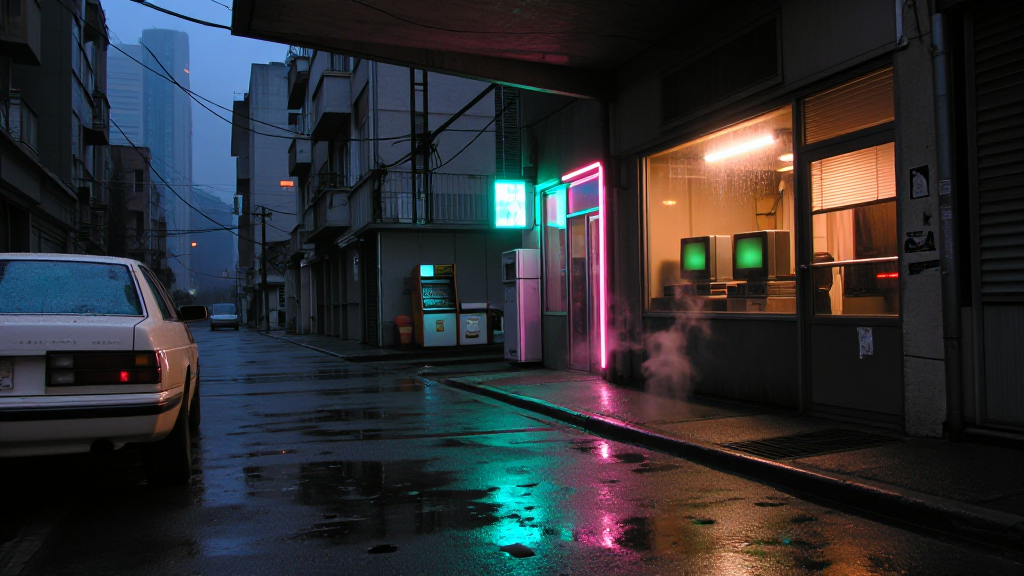
A local edit has two instructions: Change describes the result, and Only change names the target. Here, the target is the parked car. The surrounding street, storefront, and light stay in place.
SAM3.1 finds the named area. FLUX.2 Klein produces the edit, and StillRoom composites it through that mask. The result becomes a new version; the source image is retained. The comparison below shows the input, selection, and edited result.
- Change
- Change the white parked car to deep red paint. Preserve its shape, windows, wheels and reflections. Keep the surrounding street and shop unchanged.
- Only change
- car
Select where an effect appears
For motion, Where it appears turns a phrase into an effect area. In this scene, “outside the window” selects the view through the panes. The chair, lamp, and pumpkin are excluded from the rain layer.
Show area makes the selection visible. Paint area opens brush and eraser controls so I can refine the boundary. The walkthrough shows the saved selection and the refinement tools in the running editor.
Decide exactly what moves
Rain, water, mist, embers, glow, wind, and other effects are separate layers. Each has an area, pace, and intensity. Foreground masks let an effect sit behind an object instead of drifting across everything in the image.
Motion is composited around a fixed image, keeping the camera and architecture stable. Each layer can be adjusted or replaced without rebuilding the scene.
Give the place a sound
Generate ambience locally or bring in recordings. Sound layers have their own volume, stereo position, distance, and slow variation. Solo a layer to hear what it contributes, then listen to the mix.
Tidekeeper’s Hall has separate rain, hearth, and wind recordings. Music can be uploaded too. The app can prepare scene-aware music prompts, while song generation remains a separate step.
Keep a body of work together
Projects group related scenes, notes, images, and exports. Each scene keeps its own effects and sound mix.
The image library includes original generations and later edits. You can search across the collection and revisit earlier versions without losing the work that followed.
Review the loop and finish the film
Save a short visual take, inspect the join, and choose a longer export duration. The finished video uses that take and the current sound mix; earlier exports keep the mix they were made with.
The workflow supports longer MP4 exports and upscaled 1080p or 4K output. A release package can collect titles, a description, tags, and thumbnail options for review. It does not publish to YouTube.
A couple of finished visual loops
Two films I made with StillRoom: a fixed composition with atmosphere layered into it. These eight-second excerpts are silent.
How the application is built
I built the browser interface in HTML, CSS, and JavaScript, with a Python HTTP server and JSON API behind it. ComfyUI runs generation workflows; Ollama serves the vision-language model. The application and its saved work stay on the local machine.
Canvas 2D handles the brush, eraser, and mask overlays. The Web Audio API previews sound layers and their mix in the browser.
- State and revisions
- Scenes, versions, masks, and job records are local files. Revision checks reject stale updates from another browser tab, and atomic file replacement protects saved JSON from partial writes.
- Background work
- A single worker runs generation and rendering while HTTP requests remain responsive. Job states are saved. After a restart, interrupted work is marked failed instead of being silently submitted again.
- One rendering engine
- NumPy, OpenCV, and Pillow composite the image, masks, effects, and video layers. The lower-resolution browser preview uses that same code. FFmpeg encodes the final frames and mixes the audio.
- Custom ComfyUI integration
- I built a loop-processing node that accepts PyTorch image tensors, converts them to NumPy for CPU processing, and returns the composited frames as tensors. It connects image processing to the generation workflow.
- Traceable outputs
- Generated images retain their prompt, seed, model details, and ComfyUI workflow. Masks stay associated with the still version they belong to, so switching versions restores the correct areas.
Local inference with a 4B vision-language model
StillRoom uses Qwen3-VL 4B Instruct locally through Ollama, in Q4_K_M quantized form. It reads the actual image pixels to produce descriptions and tags, identify visual qualities, and suggest directions for a scene.
The app saves those observations with the image. Project summaries, scene ideas, music direction, and release text use that saved analysis alongside the project brief.
Scroll horizontally to compare all columns.
| Task | Model | Runtime | Purpose |
|---|---|---|---|
| Image understanding | Qwen3-VL 4B Instruct | Ollama · Q4_K_M | Descriptions, tags, project direction, and structured suggestions |
| Still generation | Z-Image Turbo | ComfyUI | Generate and compare candidate frames |
| Image editing | FLUX.2 Klein Base 4B | ComfyUI · FP8 | Reference-guided changes to a selected still |
| Area selection | SAM3.1 | Local segmentation | Find the regions where effects or edits should apply |
| Ambience | Stable Audio 3 Small-SFX | ComfyUI | Generate environmental sound layers |
Making local inference fit the machine
The practical constraint is a shared 16 GB GPU. Ollama and ComfyUI cannot be treated as if each owns all of its memory. The application checks the generation queue, releases idle ComfyUI models before vision work, and unloads the language model after each request.
The integration also has to survive imperfect responses. Calls request structured JSON, and the application validates the returned fields, text, and list sizes. Saved analyses are reused when revisiting images, so browsing the library does not require running the model again.
- Bounded model calls
- A single local model request at a time, with explicit unloading after completion.
- Validated outputs
- Structured responses are checked before they become suggestions or saved project information.
- Persistent analysis
- Image descriptions and project context remain available after the model process is unloaded.
- Local execution
- The assistant uses loopback endpoints with cloud access disabled in its Ollama runtime.